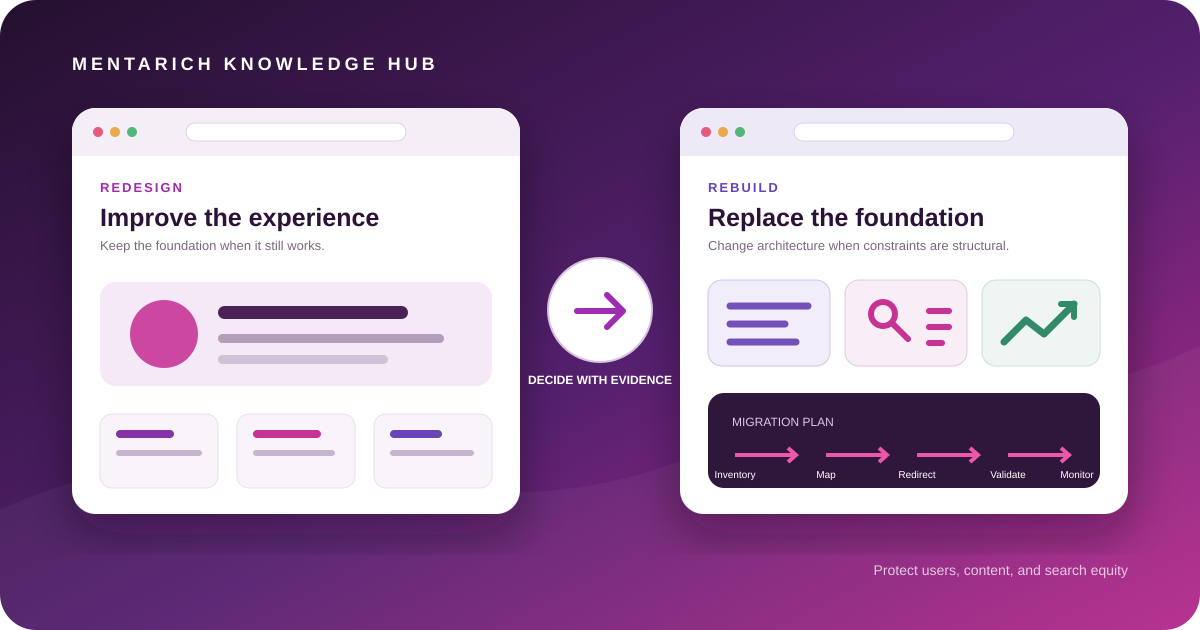
A website can look outdated while its foundation stays healthy. It can also look polished while its platform, content model, and deployment process create daily friction. That is why “we need a new website” is not yet a useful brief. The first decision is whether to redesign the experience on the existing foundation or rebuild the foundation and migrate the experience.
The terms are often used loosely, so teams underestimate the scope and search risk. A design refresh can quietly become a rebuild when templates, URLs, and content models change. A planned rebuild can become unnecessarily expensive when a stable platform could have supported the required improvements. This guide gives you a business and technical framework for choosing deliberately while protecting the search equity and customer journeys you already have.
Redesign vs rebuild definitions
What is a website redesign?
A website redesign changes the presentation and interaction layer while preserving most of the underlying platform, content model, and URL structure. The scope may include visual identity, typography, navigation presentation, page layouts, accessibility, responsive behavior, conversion paths, and reusable interface components.
A redesign can still involve meaningful development. It is not merely changing colors. The defining characteristic is that the foundation remains suitable: editors can work effectively, the system can meet performance and security requirements, the architecture reflects the business, and required integrations remain supportable.
A redesign is usually appropriate when:
- the brand or interface feels dated, but the CMS remains maintainable;
- users struggle with hierarchy, navigation, or conversion paths;
- the design system is inconsistent across templates;
- accessibility or mobile behavior needs systematic improvement;
- core URLs and content relationships remain valid;
- the platform can meet performance goals with focused engineering.
What is a website rebuild?
A website rebuild replaces or substantially changes the technical foundation. The work may include a new CMS, framework, hosting model, data structure, rendering strategy, integration layer, URL architecture, deployment pipeline, or editorial workflow. Existing content is migrated into a different system rather than simply restyled.
A rebuild is justified when the current foundation blocks the business from operating or improving safely. Examples include unsupported software, persistent security exposure, a content model that cannot represent the offering, fragile deployments, severe integration constraints, or maintenance costs that repeatedly exceed the value of incremental fixes.
A rebuild is not automatically better because the technology is newer. Every new platform creates its own ownership, skills, hosting, governance, and maintenance requirements. The objective is a more appropriate operating system for the website, not novelty.
Technical and business indicators
Separate symptoms from causes before choosing a path. A slow page does not always mean the platform is the problem.
Indicators that point toward a redesign
- Visual inconsistency: pages use conflicting components, spacing, or calls to action, but templates can be updated centrally.
- Weak information hierarchy: the content exists, yet headings, navigation, or page composition make it difficult to understand.
- Poor conversion clarity: forms and next steps need improvement without a change to backend systems.
- Responsive defects: layouts were not designed for current device patterns, but the CSS and component layer can be revised.
- Accessibility gaps: semantics, focus behavior, contrast, or controls require remediation within a supportable codebase.
- Brand evolution: positioning and visual identity changed while platform capabilities remain adequate.
Indicators that point toward a rebuild
- Unsupported or unsafe dependencies: critical software no longer receives security support, and replacement inside the current stack is impractical.
- Structural performance constraints: architecture, rendering, asset delivery, or plugins prevent the site from meeting realistic performance requirements.
- Broken editorial operations: routine changes require developer intervention because the content model or permissions cannot support the team.
- Inflexible architecture: the site cannot represent new products, locations, languages, or relationships without duplication and workarounds.
- Fragile integration layer: CRM, ecommerce, search, authentication, or other business systems cannot be connected reliably.
- Unreliable delivery: deployments are manual, difficult to test, or prone to regressions with no practical path to improve the current environment.
- Ownership mismatch: the organization cannot reasonably hire, train, or retain people to operate the existing technology.
Indicators that require diagnosis, not an immediate rebuild
A slow page does not prove the entire platform must be replaced. Large images, third-party scripts, poorly loaded fonts, or inefficient templates may be repairable. Likewise, low conversions may result from unclear positioning or traffic quality rather than technology. Run a technical, content, analytics, and user-experience audit before translating every symptom into a rebuild requirement.
Website redesign vs rebuild decision matrix
| Decision factor | Redesign is favored when | Rebuild is favored when | Evidence to collect |
|---|---|---|---|
| Platform health | Supported, secure, and maintainable | Unsupported, repeatedly compromised, or structurally fragile | Dependency status, incidents, maintenance records |
| Content operations | Editors can publish with manageable improvements | Content model and workflow prevent routine work | Editor interviews, task timings, permission needs |
| Information architecture | Core relationships and URLs remain useful | Business model has outgrown navigation, taxonomy, or URL structure | Content inventory, search data, card sorting, stakeholder map |
| Performance | Main problems are assets, scripts, or templates | Rendering and infrastructure impose systemic limits | Field data, lab diagnostics, architecture review |
| Integrations | Existing APIs and connectors are reliable | Critical integrations require brittle workarounds | Failure logs, API capabilities, ownership map |
| Design and accessibility | Component layer can be rebuilt safely in place | Current output cannot support semantic or responsive requirements | Component audit, accessibility testing |
| Team capability | Team can operate and extend the platform | Skills are unavailable or ownership is unclear | Staffing plan, support model, documentation quality |
| Change tolerance | Business wants lower migration risk and narrower scope | Business accepts migration complexity for long-term structural value | Risk register, launch constraints, rollback options |
Scorecards can support discussion, but they do not replace engineering judgment. A critical security or operational constraint may outweigh several cosmetic reasons to stay. Conversely, a preference for a fashionable framework should not outweigh a healthy system that already meets the requirements.
SEO migration risks to control
Search performance can change after either path. A redesign may alter headings, internal links, content visibility, JavaScript rendering, or page speed. A rebuild may also change URLs, canonical signals, sitemaps, response codes, and crawl behavior.
The main risks are controllable:
URL changes without precise redirects
When an old URL has a relevant new destination, use a server-side permanent redirect and avoid chains. Google’s documentation on redirects and Search describes permanent redirects such as 301 and 308 as signals that the target should be canonical. The redirect should preserve meaning, not merely send everything to the homepage.
Content loss or intent drift
Migration inventories often omit pages that receive few visits but support a high-value niche query, an integration, a customer workflow, or a strong external link. Evaluate purpose and business value before deleting. If the replacement changes intent, a redirect cannot make two unrelated pages equivalent.
Internal-link degradation
Navigation, contextual links, breadcrumbs, and related-content modules tell users and crawlers how pages connect. Update links to final destinations rather than relying on redirects internally. Check orphaned pages and anchor text after the new build renders.
Canonical, robots, and sitemap mistakes
Staging directives can reach production. Canonicals can point to preview hosts. A new XML sitemap can include redirects, noindex pages, or non-canonical variants. Validate rendered HTML and HTTP responses in the actual deployment topology, not only source templates.
Rendering and content visibility changes
A migration to client-heavy rendering can delay or prevent important content from appearing when scripts fail. Confirm that titles, descriptions, headings, links, and primary copy are present in the response or reliably rendered. Test with JavaScript disabled where that reflects a meaningful failure mode.
Analytics discontinuity
A launch can appear successful while measurement is broken. Preserve consent behavior, analytics identifiers, campaign parameters, conversion definitions, and integrations. Document any intentional measurement changes so pre- and post-launch data is not compared as if nothing changed.
Google’s site move guidance for URL changes recommends preparing the new site, creating old-to-new URL mapping, starting with a smaller section when practical, and monitoring both old and new properties. Treat that guidance as an operational process, not a final-day SEO task.
Build a content and URL inventory
A migration inventory is the control center for content decisions and redirects. Start with multiple sources because no single export is complete:
- current XML sitemaps;
- a crawl of accessible internal URLs;
- analytics landing pages;
- Search Console pages and query data;
- CMS exports;
- server logs where available;
- backlink or referral data;
- paid campaign destinations;
- CRM, email, help documentation, and product links;
- stakeholder knowledge of operational pages.
For each URL, record:
- current URL and canonical URL;
- page type, owner, and primary intent;
- organic traffic and conversion context;
- important internal and external relationships;
- indexability and response status;
- action: keep, improve, merge, redirect, archive, or remove;
- final destination and redirect rule;
- content owner and migration status;
- QA status before and after launch.
Redirect strategy
Prefer one-to-one mapping where the new page satisfies the same purpose. If several old pages duplicate one topic, consolidate them only when the destination genuinely covers their intent. Avoid redirect chains by pointing every legacy URL directly to the final URL. Preserve query parameters that carry necessary state or attribution, and test case sensitivity and trailing-slash behavior according to the platform.
Not every removed URL needs a redirect. When there is no relevant replacement and the page should be gone, a proper 404 or 410 can be more honest than an irrelevant destination. Review valuable links and customer dependencies before making that decision.
Analytics and performance baselines
Capture the baseline before development changes the environment. A useful benchmark is not one headline traffic number; it is a documented set of segments that can explain movement.
Record at least:
- organic landing-page sessions or users by page group;
- search impressions, clicks, and query themes;
- leads, signups, purchases, or other conversions by landing page;
- conversion quality where CRM data makes that possible;
- top navigation paths and internal site-search terms;
- device, geography, and branded/non-branded context where relevant;
- crawl errors, indexed coverage, and sitemap state;
- field and lab performance for representative templates;
- accessibility findings and known browser defects.
Do not promise that a redesign will increase every metric. Define acceptable launch tolerances, expected seasonal or campaign effects, and who will investigate deviations. Annotate the launch date and any measurement changes.
Core Web Vitals considerations
Core Web Vitals represent loading, interactivity, and visual stability in real-world user experience. The current metrics are Largest Contentful Paint, Interaction to Next Paint, and Cumulative Layout Shift; the official Web Vitals overview should remain the source of truth because definitions and guidance can evolve.
During design and development:
- define image dimensions and responsive sources;
- control font loading and avoid invisible or shifting text;
- reserve space for embeds, banners, and consent interfaces;
- limit third-party scripts and measure their cost;
- keep interaction handlers responsive;
- test representative templates, not only the homepage;
- compare lab diagnostics with field data once real users return.
A rebuild creates an opportunity to improve performance, not a guarantee. New frameworks can still ship oversized JavaScript, unoptimized images, or slow third-party dependencies.
CMS and architecture considerations
Choose architecture around content and operating needs.
Content model
Can the system represent services, products, authors, categories, locations, languages, reusable calls to action, and relationships without copying blocks between pages? Structured content should give editors useful control without allowing every page to become a one-off design.
Rendering and delivery
Decide which pages can be static, which require server rendering, and which interactions need client JavaScript. Consider cache behavior, preview workflows, form handling, personalization, and failure modes. The simplest approach that meets requirements is usually easier to secure and maintain.
Editorial workflow
Document roles, approval steps, scheduling, revisions, previews, asset handling, and rollback. A technically elegant CMS is a poor choice if the team cannot confidently publish or correct information.
Integration ownership
List every system exchanging data with the site, the direction of data flow, credentials and permissions, expected errors, and the team responsible. Build retries and monitoring where failure affects customers or revenue.
Portability and maintenance
Understand export options, hosting dependencies, upgrade cadence, plugin ownership, license costs, and the skills required for routine work. A rebuild should reduce unmanaged complexity, not relocate it.
Mentarich’s Web Development service approaches these choices as product and operational decisions, with search migration included in the implementation plan.
Pre-launch SEO and quality checklist
Content and routes
- Every current URL has a documented keep, merge, redirect, or removal decision.
- Priority copy, headings, metadata, and media migrated without accidental loss.
- Redirects point directly to relevant final destinations and pass automated tests.
- Internal links use final URLs and no important page is orphaned.
- Canonicals, hreflang where applicable, and pagination behavior are correct.
- XML sitemaps contain only canonical, indexable, successful URLs.
Technical quality
- Production robots directives allow intended crawling.
- Staging hosts remain protected and cannot become canonical.
- Important pages return the expected
200, redirect, or not-found status. - Structured data matches visible content and validates.
- Representative templates pass accessibility keyboard and screen-reader checks.
- Performance is tested at agreed viewport and network conditions.
- Security headers, forms, error handling, and integrations are verified.
Measurement and operations
- Analytics and consent behavior are tested from the real interface.
- Conversion events reach the expected destination.
- Search Console and sitemap submission responsibilities are assigned.
- Monitoring, alerting, rollback, and incident contacts are documented.
- Content editors have completed a realistic publish-update-preview workflow.
- Stakeholders approved launch against defined acceptance criteria.
Post-launch monitoring
Launch is the beginning of migration verification.
Immediately confirm the production hostname, HTTPS behavior, redirects, canonical tags, robots rules, sitemap, analytics, forms, and key customer journeys. Crawl the new site and compare it with the approved URL inventory. Check that redirects do not loop or chain and that assets load without mixed-content or permission errors.
Over the following crawl and demand cycles, monitor:
- server errors and unexpected not-found URLs;
- Search Console indexing and sitemap reports;
- old URLs that continue receiving visits or links;
- organic landing-page trends by template and intent;
- branded and non-branded query patterns;
- conversion volume and quality;
- real-user Core Web Vitals;
- editor or customer reports that reveal missed workflows.
Investigate by change category. If one template declines while others remain stable, inspect that template’s content, links, rendering, and metadata. If all channels decline, verify analytics and availability before assuming search visibility changed. Keep the old inventory, benchmark, and release record so the team can reason from evidence.
The related guide SEO vs AEO vs GEO explains how search and answer visibility should connect to business outcomes after the migration stabilizes.
Cost and timeline factors
A redesign is usually narrower, but cost depends on component diversity, accessibility remediation, content changes, integrations, and approval cycles. A rebuild carries additional discovery, architecture, migration, development, redirect, testing, training, and launch responsibilities.
| Factor | Redesign impact | Rebuild impact |
|---|---|---|
| Discovery | User journeys, brand, components, conversion issues | All redesign discovery plus platform, data, integration, security, and migration analysis |
| Content | Selective restructuring or rewriting | Inventory, modeling, transformation, migration, and validation |
| Engineering | Front-end component and template work | Front end, backend or CMS, infrastructure, integrations, migration tooling |
| SEO | On-page and rendering validation | Full URL mapping, redirects, crawl controls, parity testing, monitoring |
| Quality assurance | Visual, responsive, accessibility, browser, analytics | All redesign QA plus data, permissions, deployment, redirects, and failure recovery |
| Operations | Component documentation and editor updates | New workflows, training, ownership, support, and upgrade planning |
Timeline risk often comes from decisions and content rather than coding. Identify who approves information architecture, copy, visual design, legal or compliance material, tracking, and launch. Make dependencies visible. Protect a stabilization window rather than scheduling the next major campaign immediately after migration.
A practical final decision
Choose a redesign when the system can support the next stage of the business and the primary problems live in communication, interface, accessibility, or conversion design. Choose a rebuild when the foundation prevents secure, maintainable, and scalable operation because evidence shows incremental repair would preserve the constraint.
Whichever path you choose, preserve what already works. Inventory before deleting, benchmark before comparing, map before redirecting, test before launching, and monitor before declaring the migration complete. If you need an independent technical and search assessment, contact Mentarich to turn the decision into a scoped roadmap instead of an open-ended rebuild.